Typography decisions are expensive. Pick the wrong typeface and you’ll discover it at the worst possible moment — when the headline is already in the CMS, when the client has approved the mockup, or when the font file turns out to lack the glyphs your language needs. Fontlu exists to shrink that gap between “I think this font works” and “I know it works.”
But here’s the problem: if you search for Fontlu right now, you’ll find a dozen articles that describe completely different products. One calls it a simple free preview tool. Another calls it an AI-powered enterprise font-management platform with team collaboration and licensing compliance. Both cannot be fully true. This guide focuses on what is verifiable as of late 2026, flags what remains unconfirmed, and gives you a practical workflow that works regardless of which version of Fontlu you encounter.
Quick Overview: Fontlu at a Glance
- Core identity: A free, browser-based font preview and comparison tool built on Google Fonts.
- Font library: 45+ Google Fonts, filterable by sans-serif, serif, display, monospace, and handwriting.
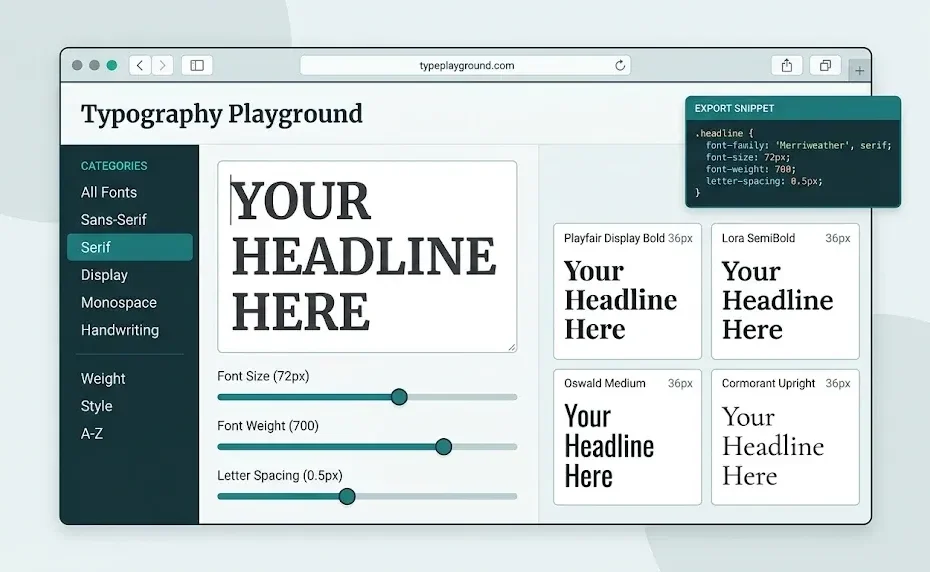
- Live preview: Type your own copy and adjust size, weight, line height, letter spacing, word spacing, color, background, alignment, transform, and decoration in real time.
- Pairing: A “Pairs” tab with 12 curated heading-and-body combinations.
- Comparison: A “Compare” tab that stacks up to eight fonts side by side with the same text.
- Export: Copy a CSS snippet or Google Fonts HTML link directly from the tool — no download or account required.
- What’s disputed: Claims about AI-driven pairing, Figma/Canva integrations, team management, and enterprise licensing tools are not consistently confirmed across sources.
What Is Fontlu, Really? Separating the Tool from the Marketing
Let’s start with the clearest, most concrete description available. Fontlu is a free, browser-based typography tool for designers, developers, and anyone who works with text. You preview your copy in 45+ Google Fonts, control every typographic property with sliders, and export the CSS when you’re done. No download, no login, no cost.
That is the version you can actually use. The broader claims — AI-driven pairing recommendations, team-wide brand consistency, licensing compliance dashboards, DesignOps collaboration — appear in articles that describe a more ambitious product. Some of those articles are promotional. Some contradict each other. And at least one detailed review notes that Fontlu’s own site blocks automated access, making independent verification difficult.
The practical takeaway: Treat Fontlu as a fast, free testing layer for Google Fonts. If an article promises enterprise features, verify them directly before building a workflow around them.
How the Live Preview Works (And Why It Beats Guesswork)
The live preview is the feature that earns Fontlu a place in your browser. You type a word, a sentence, or a full paragraph. The tool renders it instantly in the selected font. Then you adjust the controls — size, weight, line height, letter spacing, word spacing, color, background, alignment, transform, decoration — and watch the typeface respond in real time.
This matters more than it sounds. A font that looks elegant as a single sample word can collapse when stretched across a headline. A typeface that feels readable at 32px can become a blur at 14px. Testing your actual copy, at your actual sizes, exposes those problems before they enter a design file.
The three-copy test
A practical habit: paste three things into the preview, not one.
- A short brand name or headline — checks how the font handles tight letter combinations and display weight.
- A full sentence — checks rhythm, spacing, and how the font feels across a line.
- Something with numbers and punctuation — checks consistency across characters that often reveal sloppy font design.
If a font passes all three at the sizes you’ll actually use, it’s a serious candidate. If it fails one, move on.
Pairs, Compare, and Export: The Three Tabs That Do the Work
Fontlu’s interface is organized around three practical tasks: finding a pairing, comparing candidates, and exporting production code.
The Pairs tab: 12 curated combinations
The Pairs tab showcases 12 curated heading-and-body combinations, ranging from editorial elegance to bold minimalism. This is not an infinite AI generator. It is a small, opinionated set of pairings that have been assembled to demonstrate contrast and harmony. For beginners, that constraint is a feature: fewer options, faster decisions. For experienced designers, it’s a starting point worth testing rather than a final answer.
The Compare tab: eight fonts, one sentence
The Compare tab lets you stack up to eight fonts side by side using the same text. This is where shortlisting actually happens. Instead of opening eight browser tabs and pasting the same headline eight times, you see the candidates in a single view. Differences in weight, width, and personality become obvious when they’re adjacent.
Export: CSS or Google Fonts link
When you find a combination that works, the export panel gives you a CSS snippet or a Google Fonts HTML link that you can drop straight into a project. That eliminates the copy-paste errors that happen when you manually reconstruct font-family declarations. The exported CSS includes the font import, the family stack, and the typographic properties you adjusted in the preview.
Why this matters for ranking content: Google’s helpful content guidance rewards pages that demonstrate first-hand, practical value. A tool that exports working code is a concrete example of that value — not a vague claim about “streamlining workflows.”
What Fontlu Does Well (And What It Doesn’t Try to Do)
Fontlu is strong at decision support. It helps you test, compare, and shortlist fonts before you commit. That is a specific job, and it does it without requiring an account, a download, or a credit card.
It is not a full font manager. It does not install fonts on your system, organize a local library, or track licenses across a team. It does not replace Figma, Adobe Fonts, or your operating system’s font book. And it does not guarantee that a font is safe for commercial use — the tool previews Google Fonts, but licensing still depends on how you use the font and in what context.
A quick comparison
| Task | Fontlu | Traditional font manager |
|---|---|---|
| Preview with your own text | Yes, real-time | Rarely |
| Compare multiple fonts side by side | Yes, up to 8 | No |
| Curated pairings | Yes, 12 combinations | Rarely |
| Export CSS / Google Fonts link | Yes | No |
| Install and organize local fonts | No | Yes |
| Track licenses across a team | Not confirmed | Sometimes |
| Cost | Free | Varies |
This is not a weakness. It is a scoping decision. Fontlu occupies the testing and shortlisting phase; your design software and font manager occupy the execution phase.
Licensing: The Part That Still Needs Your Attention
Fontlu uses Google Fonts, which are generally open-source and free to use. But “open-source” does not mean “no rules.” Most Google Fonts are licensed under the SIL Open Font License or the Apache License, which permit commercial use, modification, and redistribution — but with conditions. Some require that the font not be sold by itself. Some require that modified versions use a different name.
More importantly, Google Fonts is not a single license. Each family has its own terms. If you are embedding a font in an app, a logo, or a paid product, you need to check the specific license for that family. Fontlu’s preview does not replace that check. You can browse the full catalog and license details directly on Google Fonts.
Rule of thumb: A free preview is not a license. If a font matters enough to use in a commercial project, it matters enough to spend two minutes reading its license page.
For teams that need formal license tracking, a dedicated font-management platform is the right tool. For individuals and small projects, the Google Fonts license pages are sufficient — as long as you actually read them.
Who Should Use Fontlu (And Who Should Skip It)
Fontlu is a good fit for freelancers, bloggers, developers, students, and small business owners who need to make a font decision quickly and don’t want to install five typefaces just to compare them. It is also useful for content creators who need to check how a heading font behaves on a mobile screen before committing to a template.
It is not the right tool for enterprise brand teams that need centralized font governance, role-based access, and license auditing across dozens of designers. Those teams need a font-management platform, not a preview tool. If an article tells you Fontlu does those things, ask for a public demo before you believe it.
How to Use Fontlu in a Real Project: A Five-Step Workflow
Here is a process that works whether you’re choosing a blog heading font or shortlisting display faces for a client pitch.
- Define the tone in one word. Before you browse, decide what the project should feel like — editorial, technical, warm, bold, minimal. This prevents endless scrolling.
- Filter by category, not by name. Use the Browse tab to narrow to sans-serif, serif, display, monospace, or handwriting. If you’re choosing a body font, start with sans-serif or serif. If you’re choosing a headline, display is fair game.
- Run the three-copy test. Paste a short name, a full sentence, and a numbers-heavy string. Adjust the size to the smallest size you’ll actually use. If it breaks, drop it.
- Compare your shortlist side by side. Use the Compare tab to stack your top candidates with the same text. Three to five fonts is enough. More than that and you’re avoiding the decision.
- Export and test in context. Copy the CSS or Google Fonts link into a real page or a code sandbox. A font that looks great in the preview can behave differently once line lengths, padding, and responsive breakpoints enter the picture.
A note on “AI pairing”
Some articles describe Fontlu as offering AI-driven pairing recommendations. The publicly verifiable tool offers curated pairings, not a generative AI system. That distinction matters: curated pairings are a starting point built by a human; AI pairing is an algorithmic recommendation. Neither replaces your judgment, but they are different features. If AI pairing is important to you, test it directly before assuming it exists.
For developers who want to understand how font loading works after export, the Google Fonts API documentation explains how to load font families and control rendering behavior with parameters like font-display.
Fontlu vs. the Alternatives: When to Use Something Else
Fontlu is not the only tool in this space, and it doesn’t need to be. The right choice depends on what you’re trying to do.
- If you need a massive free library with broad language coverage, Google Fonts itself is the canonical source. Fontlu previews a subset of it; Google Fonts lets you browse the full catalog.
- If you need premium typefaces with formal licensing support, Adobe Fonts or a foundry like MyFonts is the appropriate route.
- If you need AI-generated pairings, tools like Fontjoy or Mixfont offer algorithmic combinations. Fontlu’s curated pairs are a different approach — smaller, more opinionated, and faster to scan.
- If you need local font organization and activation, a traditional font manager (Suitcase, FontBase, or your OS font book) is the right tool.
The mistake is expecting one tool to do all four jobs. Fontlu’s value is that it does one job — preview and compare Google Fonts — without friction.
Key Takeaways
- Fontlu is a free, browser-based preview tool for 45+ Google Fonts — no login, no download, no cost.
- It offers live preview, a 12-combination Pairs tab, an eight-font Compare tab, and CSS export.
- The tool is strongest at decision support, not font management or enterprise licensing.
- Claims about AI pairing, team features, and Figma/Canva integrations are not consistently verified — treat them as unconfirmed until you test them.
- Licensing still matters. Google Fonts are generally open-source, but each family has its own terms.
- The practical workflow is: define the tone, filter by category, run the three-copy test, compare side by side, and export to a real project.
FAQ
Is Fontlu really free?
Yes. The verifiable version of Fontlu is a free, browser-based tool. It does not require an account or a download, and it exports CSS or Google Fonts links at no cost.
Does Fontlu use Google Fonts?
Yes. The tool previews 45+ Google Fonts and lets you filter by sans-serif, serif, display, monospace, and handwriting. It is not a full mirror of the entire Google Fonts library, but it covers a practical subset.
Can I use Fontlu fonts for commercial projects?
The fonts themselves are Google Fonts, which are generally open-source and permit commercial use. But you still need to check the specific license for each family, especially for app embedding or logo use. The preview tool does not replace a license check.
Does Fontlu have AI font pairing?
The publicly verifiable tool offers 12 curated heading-and-body pairs, not a generative AI pairing system. Some articles claim AI pairing, but those claims are not consistently confirmed. Test the tool directly if AI pairing is a requirement.
Is Fontlu a font manager?
No. Fontlu is a preview and comparison tool. It does not install fonts, organize a local library, or track licenses across a team. For those tasks, you need a dedicated font manager.
What’s the fastest way to compare fonts on Fontlu?
Use the Compare tab. Paste your headline once, then stack up to eight fonts side by side. This is faster than opening multiple browser tabs and eliminates copy-paste errors.
Conclusion
Fontlu won’t choose the font for you. No tool will. But it removes the friction that makes font selection slower and more frustrating than it needs to be. You can test your real copy, compare real candidates, and walk away with working CSS — in the time it used to take to download and install a single font.
The internet will keep publishing contradictory articles about what Fontlu “is.” Ignore the noise. Open the tool, run the three-copy test, and let the preview tell you what actually works. That’s the only review that matters.
You Also Like To Read: Instanavigation in 2026: How It Works, What Changed, and What You Need to Know